
Run your restaurant from the table, not the counter.
POSMena's iPad and tablet POS gives every server a full command center. Tableside ordering, instant kitchen sync, split bills, live food cost tracking — with local e-invoicing compliance built into every transaction.
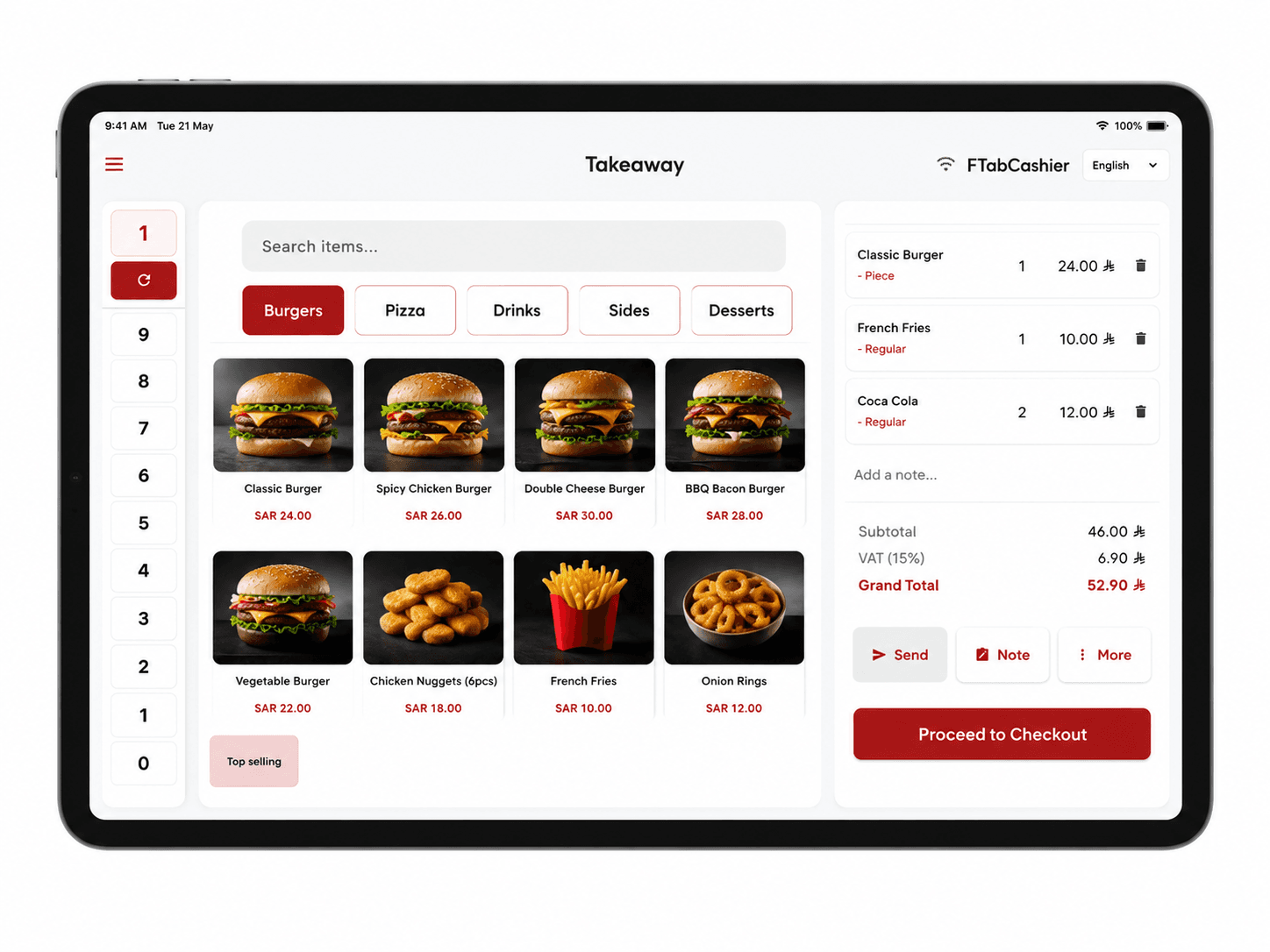
Tableside ordering
Servers take orders at the table and fire directly to the kitchen — no paper relay, no lost tickets, no miscommunication between front and back of house.
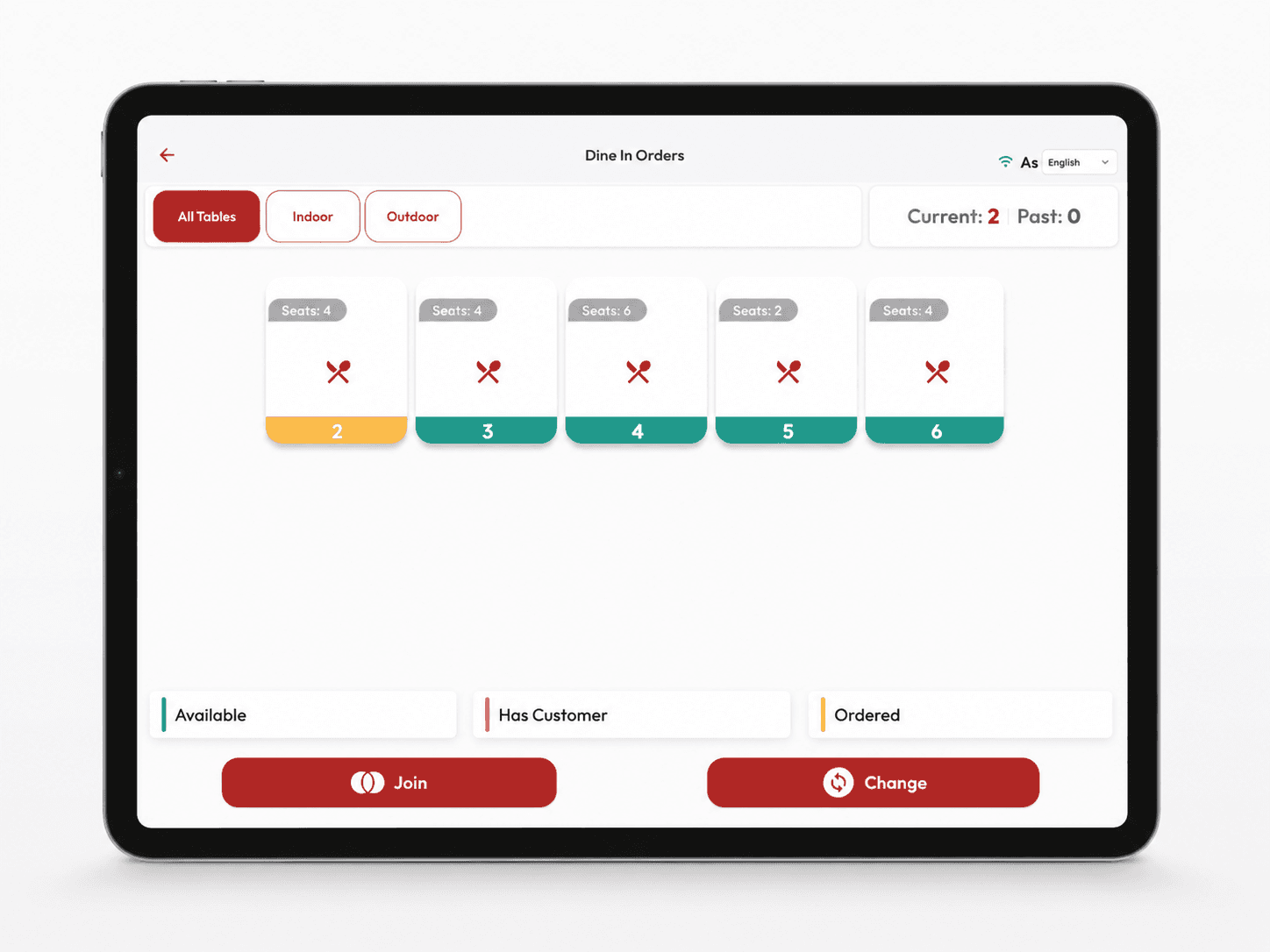
Live floor plan
Color-coded table status across indoor and outdoor sections. Join, split, or reassign covers in one tap from any iPad — all devices stay in sync.
NFC & contactless payments
NearPay certified for Android tablets — the device acts as the payment terminal with no external reader. Accept Visa, Mastercard, and Google Pay tap directly on screen.
Retail & barcode scanning
Switch to retail mode for scan-to-add inventory. Browse by category, search by SKU, auto-calculate VAT — same device, same session.
Course-based ordering
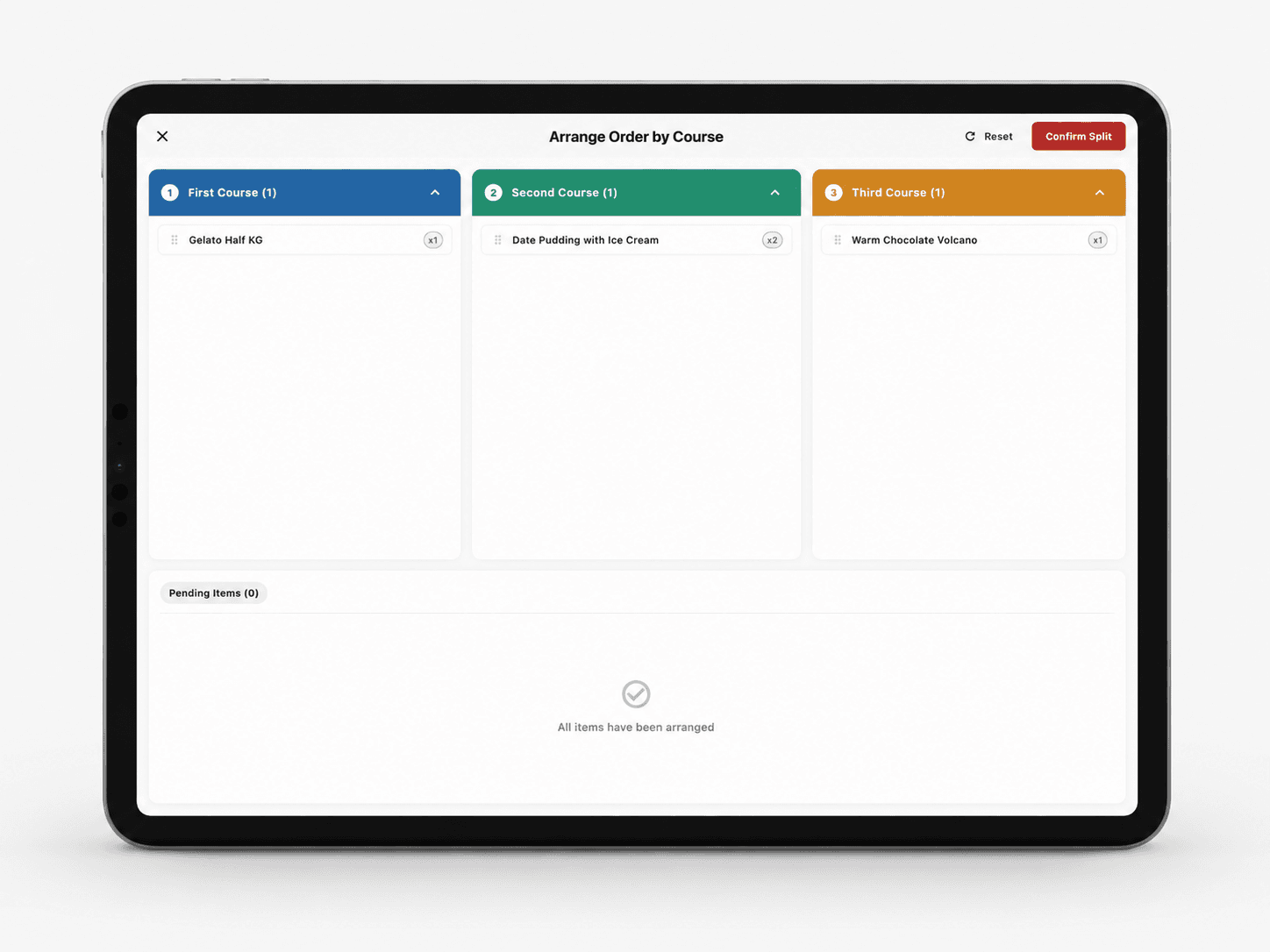
Arrange items into First, Second, and Third course lanes. The kitchen fires each course at the right time — automatically, without a runner.
Per-guest item assignment
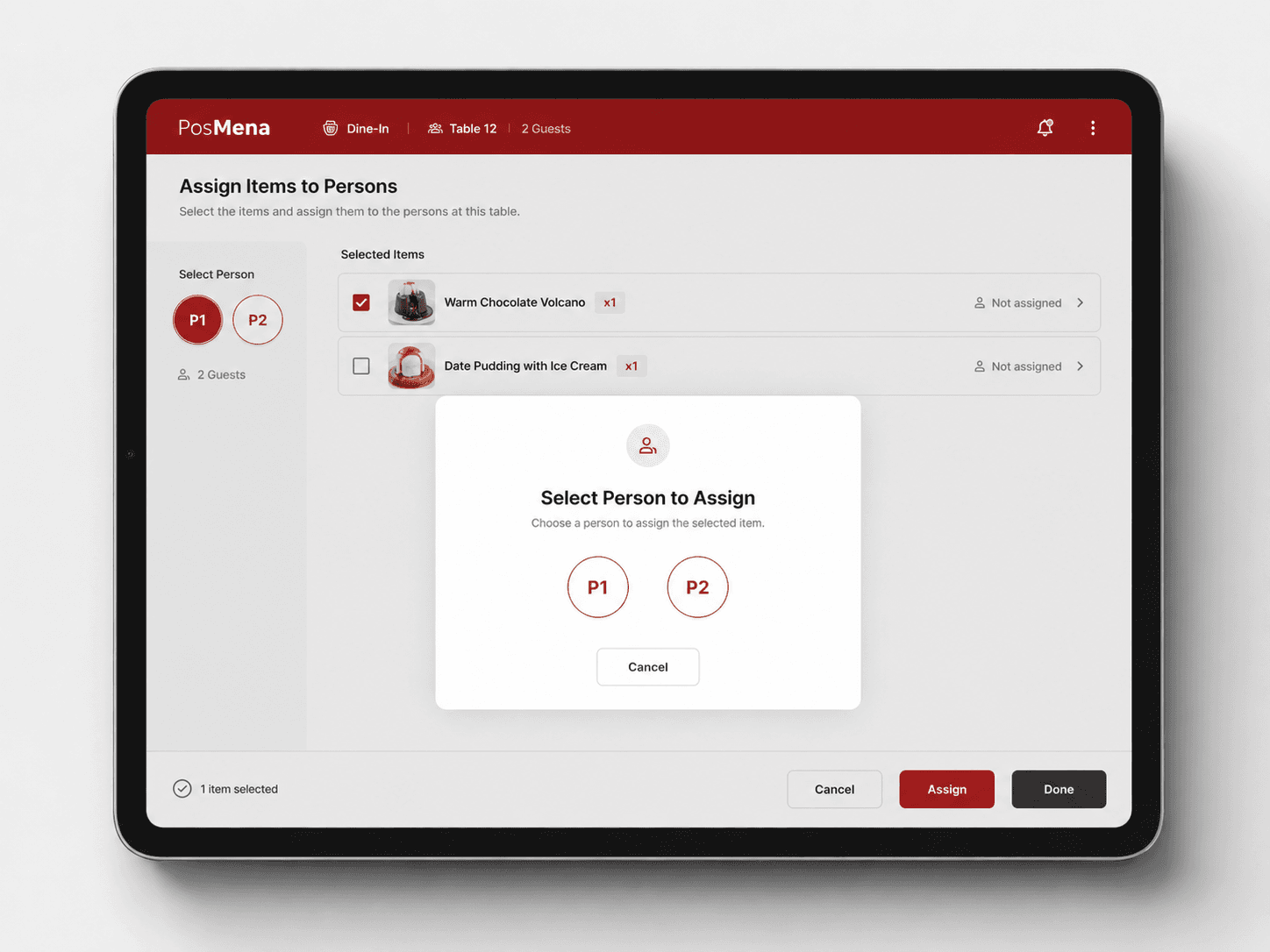
Assign each dish to a specific person at the table during order entry. Split the bill by person at checkout — no manual re-sorting, no guesswork.
Local e-invoicing, built in
QR invoices, digital signatures, and tamper-resistant audit logs generated at the point of sale — built into the transaction, not assembled for reporting. Adapts to your country's e-invoicing authority with no separate compliance module.
One floor plan. Every device on the same state.
The floor plan updates in real time as tables open, order, and close out. Your host, your servers, and the cashier all see the same view — across every iPad in the outlet.
- Indoor and outdoor sections, color-coded by service status
- Join or split covers without voiding active orders
- Service timer per table — visible from any device
- Updates live, no refresh or sync step required
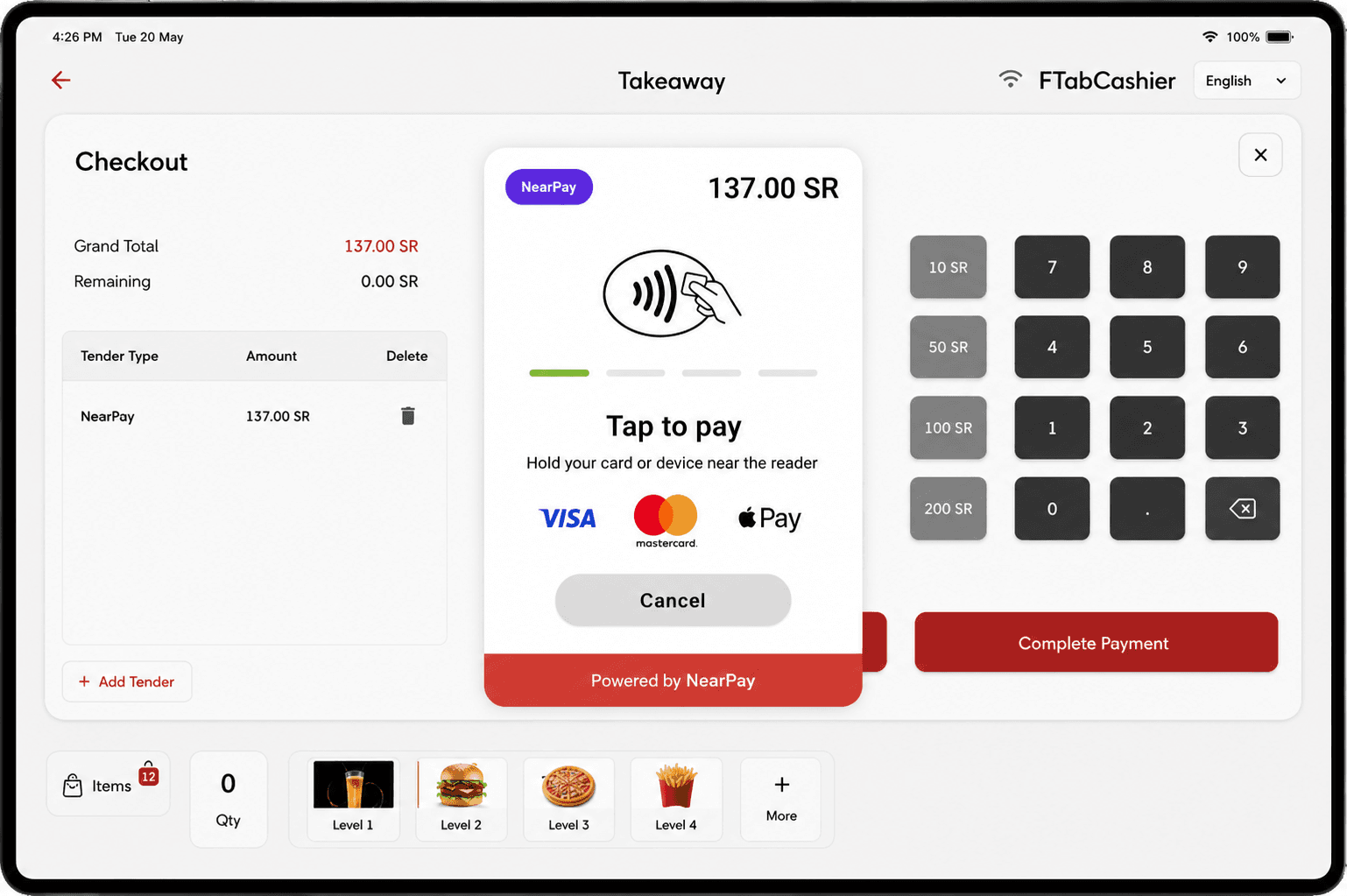
NearPay built in. The Android tablet is the terminal.
On Android tablets, POSMena turns the device into a certified NearPay payment terminal — no card reader, no hardware pairing. Guests tap Visa, Mastercard, or Google Pay directly on screen. A tax-compliant receipt generates immediately.
- Android tablets only — NearPay uses the built-in NFC chip
- Visa, Mastercard, Google Pay tap-to-pay on the same screen
- Split between multiple guests in a single checkout flow
- Tax-compliant e-receipt generated at the point of tap
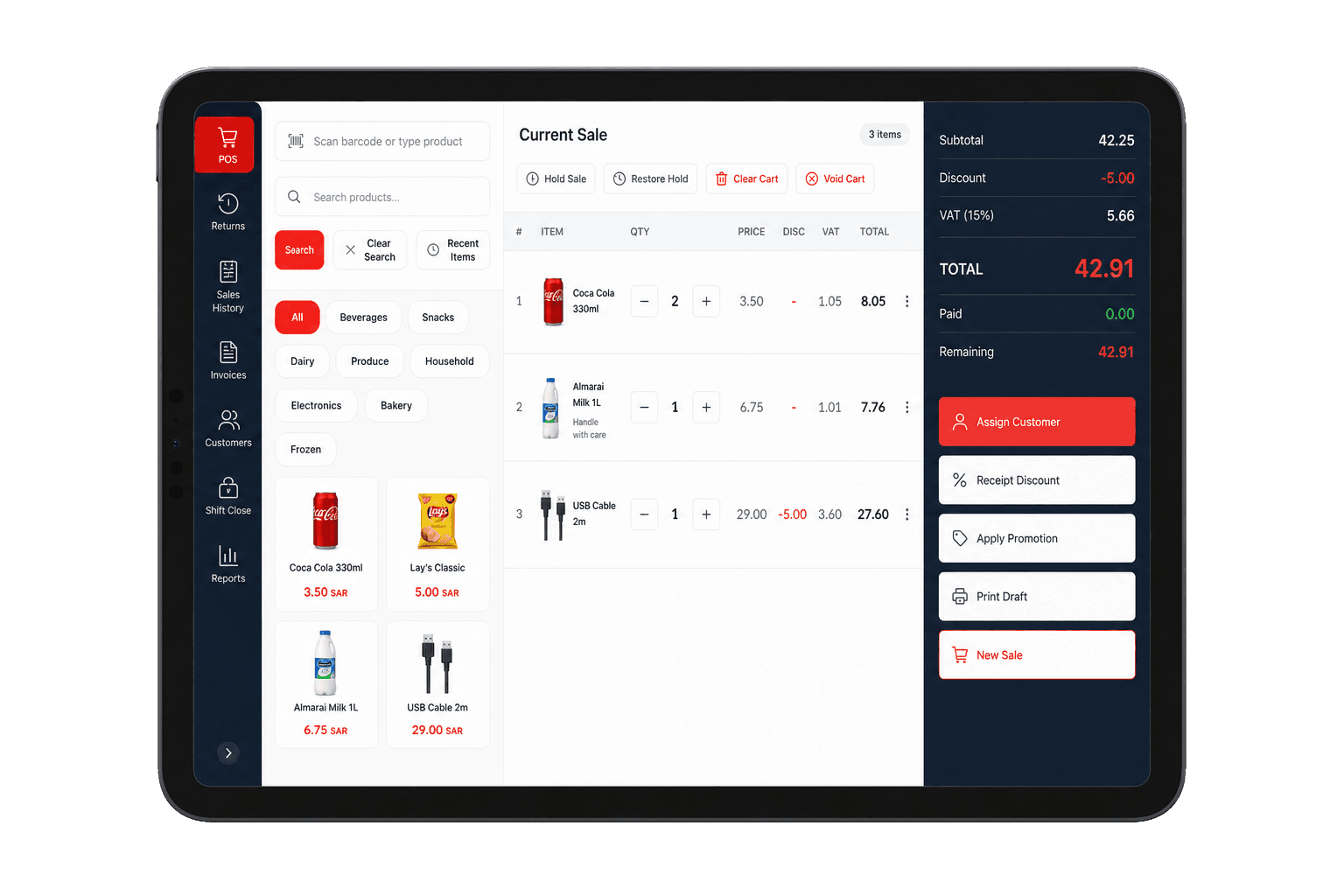
Scan to sell. Deduct from inventory. Same device.
Switch the same tablet to retail mode for packaged goods, merchandise, or grab-and-go items. Barcode scan or browse by category, VAT auto-applies, and the item deducts from inventory at the moment of sale.
- Barcode scan or category browse — no secondary retail system
- VAT calculated and itemized automatically per product
- Inventory deducted at point of sale, not end-of-day
- Operates alongside F&B on the same device and session
Arrange by course. The kitchen fires each one on cue.
Servers assign dishes to First, Second, and Third course during order entry. The KDS fires each course at the right moment — starters leave the kitchen before mains are started. No verbal relay, no timing errors.
- Course assignment happens during order entry, not after
- KDS fires each course automatically on the correct cue
- Works across multiple tables at the same time
- Eliminates front-to-back timing coordination
Every dish assigned to a person. Bill split happens automatically.
Servers assign each item to a specific guest during order entry — Starter for P1, Main for P2, shared dessert. When it's time to pay, each guest sees only their items. No re-sorting, no manual arithmetic.
- Assign items to named guests during order entry, not at checkout
- Split bill by person in one tap — exact amounts, no rounding
- Works alongside course ordering on the same table
- Each guest can pay separately by card, cash, or digital wallet
How It Works
Open the table
Select table from the floor plan, scan a QR cover, or start a walk-in order from any iPad in the outlet.
Order with modifiers
Tap items, add modifiers and special requests, set course order. Send to kitchen in one tap.
Kitchen receives instantly
Orders appear on each KDS station — grills, cold prep, beverages — grouped, color-coded, and timed from the moment they're fired.
Close and pay
Print or send the bill, split between guests, collect any payment type, and issue a country-compliant e-receipt.
Built for Your Business Type
Full-service restaurants
Table mapping, multi-course ordering, cover-based billing, and real-time service timing per table.
Cafés & coffee shops
High-throughput service, modifier-heavy menus, loyalty integration, and stable offline mode for peak hours.
Food trucks & pop-ups
Portable iPad setup, mobile payments, full offline operation, and lightweight kitchen display sync.
Airport & mall F&B
Multi-brand outlet support, Pathfinder reporting, and outlet-level margin visibility per format.
POSMena vs POS Warisan
| Capability | POSMena Tablet POS | Legacy POS |
|---|---|---|
| Kitchen routing | Items route by station — grill, cold prep, drinks each see only their orders | Single printer ticket or manual station assignment |
| Food cost tracking | Every order deducts recipe ingredients and updates branch food cost live | Sales total only — no cost visibility per transaction |
| Local e-invoicing | QR invoice, digital signature, and audit log at point of sale — adapts to your country's tax authority | Requires separate compliance module or manual export |
| Multi-branch reporting | Company, brand, region, and branch — each level with its own menus and costs | Single-location view — no brand or region hierarchy |
| Offline mode | Full order and payment processing offline — auto-syncs when connection restores | Fails or requires manual fallback on connectivity loss |
| ERP integration | Microsoft Dynamics, SAP, Odoo, NetSuite — mapped at branch level | Bulk CSV export or no direct integration |
Pertanyaan yang sering diajukan
Does POSMena's tablet POS work on iPad and Android tablets?
+
Does the tablet POS work offline?
+
Does the tablet POS include local e-invoicing compliance?
+
How many tablets can I run in one branch?
+
Can I use the tablet POS for both ordering and payment?
+
Siap merevolusi bisnis Anda?
Lihat POSMena secara langsung dalam demo yang disesuaikan 20 menit. Tanpa kewajiban. Tanpa kartu kredit.